
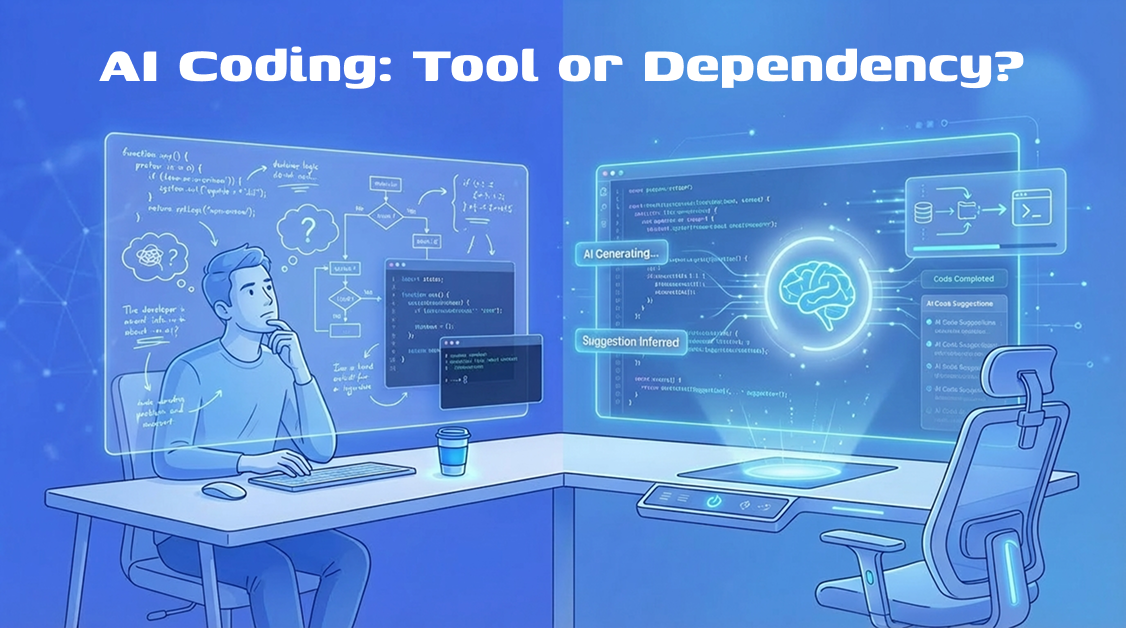
Last year, I had the opportunity to mentor a student whose story is worth sharing. He was able to build a working login page in under ten minutes using AI. He would paste a prompt, get the code, tweak a few names, and variable and deliver it. Fast, clean, and functional.
When I asked him a single question: “What is a JWT and why does your app use it?“
He sat there, in total silence, looking at the screen completely blank for about half a minute. I thought he wasn’t an exception. It as a result of what happens when developers start treating AI as a “Brain-Replacement” instead of a tool. And honestly, I have caught myself falling into the same trap on my own MERN projects.
This goal of this article isn’t to discouraged you for using AI, in fact, it’s an staple of my own toolkit to. It saves me real time on real work. But there is a way to use it that makes you sharper, and a way that quietly hollows out your skills without you noticing. Let’s explore both the ends of the specturm.
If you want a broader breakdown of how AI is reshaping development as a whole, I covered that in my complete guide on balancing AI tools with real coding skills. Complete guide on balancing AI tools with real coding skills
The Real Role of AI in Coding (It’s Not What You Think)
Many developers frame AI as “a faster way to write code.” That framing is technically true but practically misleading.
What actually happens when you use a tool like GitHub Copilot or Cursor for coding: you are shifting from writing decisions to reviewing decisions. Instead of making decisions, you are now evaluating them. This subtle change fundamentally rewires your entire workflow.
When you write code from scratch, you are forced to build and write about your logic. When AI writes it, you are judging something that already exists, you just evaluate / reacts to it. They are two entirely different ways of thinking.
“One process strengthens your ability to build logic; the other only sharpens your ability to recognize patterns.”
Neither is wrong. But if you rely on the second one, you lose the first one, you lose the ability to build.
Thinks of it this way: Scaffolding an Express route is easy for AI; understanding why that route’s middleware is failing is your job. AI won’t troubleshoot a failing middleware chain in production. That remains a human responsibility, so understanding the core is far much important the just writing the code using AI.
This aligns with broader industry findings. Research from GitHub has shown that developers using AI tools like Copilot can complete tasks significantly faster, but those studies focus on speed, not long-term code comprehension or maintainability. [Source: https://github.blog/2023-03-22-github-copilot-x-the-ai-powered-developer-experience/]
According to a survey by Stack Overflow’s in 2024 [Link], more than 76% of developers are already using AI tools and others are looking forward to use it in their workflow. This widespread shift is becoming a new industry standard, instead of just a niche trend. Now we just have to know how you use these tools, instead of deciding whether to you use them or not.
Why Developers Become Dependent on AI (And Don’t Realize It)
Dependency is a subtle process, it doesn’t happen overnight. Instead, it develops through small, reasonable so-called “smart” decisions.
It begins like this: you have a deadline. AI generates 80% of what you need. You ship it. It works. You think, “That was smart!” And it was. That was the tool working exactly as intended.
But then the next time, arrives a similar problem, you reach for AI, before you even attempt to reach the logic. That is where the shift starts.
There are two psychological traps worth naming here:
The copy-paste loop. You accept AI-generated code, it works, so you never dig into how is it working. Over time, you have a codebase full of patterns you did not consciously choose. When something breaks in a way that cuts across those patterns, you have absolutely no mental map to navigate by.
Blind trust bias. AI sounds confident. Its code looks clean. That confidence is contagious and addictive, and it makes you less likely to question or even double check it. I have reviewed some junior’s projects where they had AI-generated authentication logic with no input sanitization, no rate limiting, nothing! When I asked the “why”, the answer was, “Copilot wrote it, so I figured it was fine.”
This is even more risky when you consider that large language models are known to confidently generate incorrect or incomplete solutions, this behavior is also referred to as “hallucination” in AI research. Read more about this topics here: https://arxiv.org/abs/2304.13734
It is “NOT FINE” and the tools are not designed to flag that for you. Thats by default!
The AI Dependency Spectrum
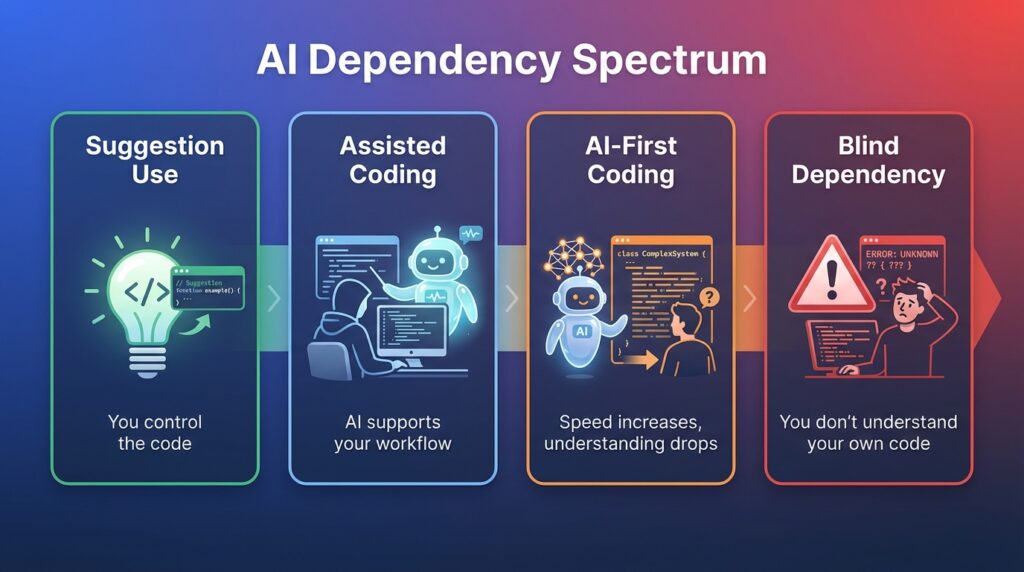
That’s not all-or-nothing. Think of it as a spectrum: from healty level (Level 1) to danger zone (Level 4), where blindly depending on AI could be fatal for your application.
Level 1: Suggestion use. AI autocompletes lines. You are still thinking and directing. This is healthy.
Level 2: Assisted coding. You prompt for functions or components. You read, understand, and adapt the output. Still healthy, perhaps it’s your most productive zone.
Level 3: AI-first coding. You describe a feature and accept large blocks of output with minimal review. You are moving fast, but you are starting to skip the understanding step, this is only healty if you know the logic and wants to speed up the boring stuff, but architecture should be known.
Level 4: Blind dependency. You could not explain what the code does without re-reading it. You do not own the architecture. This is where real problems start. This causes fatal level of silent bugs that can arise in the production damaging the application, breaking your confidence.
Most developers I work with and I know, operate around Level 2 to 3. The goal is to stay intentional about which level you are at, and why. They control the dominantation of architecture.
The Right Way to Use AI in Your Coding Workflow
Here is how I actually use AI on my MERN projects, not the idealized version, the real one. This is going to help you alot.
For Backend API work, I use AI to scaffold the boilerplate, things like controller structure, route registration, basic middleware setup. I write the business logic myself. This is where the domain-specific reasoning lives, and AI does not know my data relationships or architectural requirements for my project.
For MongoDB queries, I ask AI to suggest a query structure, then I read it carefully and test it against edge cases manually, here most developers thinks AI wrote it, so I figured it was fine. AI-generated queries can be logically valid but miss index considerations or return more data than you intended. For Instance, a query that skips a compound index on a large collection will work perfectly in development and crawl in production and definitely AI will not warn you about that.
As noted in MongoDB’s own performance guidelines, inefficient queries and missing indexes can drastically impact performance at scale.
For React components, AI is great for layout and repetitive UI patterns. Where I stay hands-on is state management and side effects. useEffect bugs are subtle. If AI writes the logic and I do not trace through it myself, It will cost me twice as long debugging it later.
The general loop I use: Prompt, Generate, Read, Understand, Then Accept. That “Read and Understand” step is not optional. It is the entire point.
The Human-in-the-Loop System Every Developer Needs
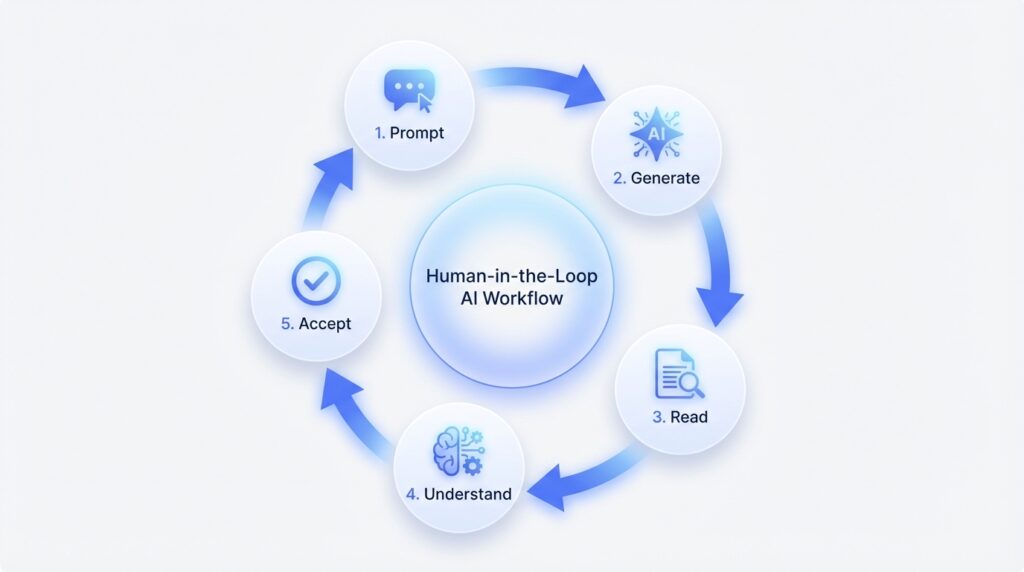
Here is a simple framework that has worked for me and my students:
- Prompt with intent. Do not just describe what you want. Describe the constraints. “Generate a POST route for user login. It should validate the request body, use bcrypt to compare passwords, and return a signed JWT. Do not store tokens server-side.”
- Generate and read. Do not run the code before you read it. Spend two minutes tracing the logic manually.
- Review for gaps. What did the AI not handle? Error cases, edge inputs, security checks?
- Test deliberately. Happy path is not enough. Test what happens with missing fields, invalid types, duplicate requests.
- Refactor to own it. After you accept the code, rename variables to match your conventions. Add your own comments. This is not just tidiness. It forces you to process what the code actually does.
This loop takes longer than just accepting AI output. It is supposed to. The extra time is where the learning happens.
A Real Example: Using AI Without Losing Control
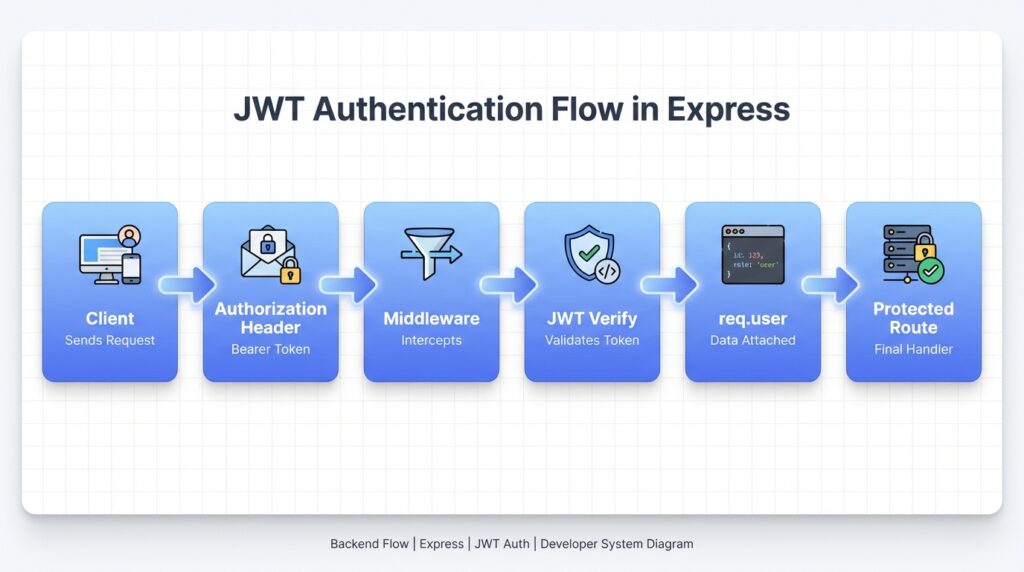
This is where most articles stop being useful. Let me show you what this actually looks like in practice.
Say I am building a protected route in an Express/Node backend. I need middleware that checks for a valid JWT before allowing access to a resource.
The prompt I gave:
“Write Express middleware that checks for a JWT in the Authorization header. It should verify the token using jsonwebtoken, extract the user ID from the payload, and attach it to req.user. Return a 401 if the token is missing or invalid.”
What the AI returned:
const jwt = require('jsonwebtoken');

const protect = (req, res, next) => {
  const token = req.headers.authorization?.split(' ')[1];

  if (!token) {
    return res.status(401).json({ message: 'No token provided' });
  }

  try {
    const decoded = jwt.verify(token, process.env.JWT_SECRET);
    req.user = decoded;
    next();
  } catch (err) {
    return res.status(401).json({ message: 'Invalid token' });
  }
};

module.exports = protect;
What the AI got right:
The structure is solid. It correctly splits the Bearer token, handles the missing token case, and uses a try/catch around jwt.verify. For a basic implementation, this would pass a code review at first glance.
What the AI got wrong:
Two things stood out when I read it carefully.
First, req.user = decoded attaches the entire decoded payload to the request object. Depending on what is in your JWT payload, that could include sensitive fields you do not want leaking into downstream route handlers. Better to be explicit: req.user = { id: decoded.id }.
Second, there is no token expiry check beyond what jsonwebtoken does by default. That is fine if you always sign tokens with an expiresIn option, but the AI made no mention of that assumption. If a developer uses this middleware without setting token expiry at sign time, they have sessions that never expire.
What I changed:
req.user = { id: decoded.id, role: decoded.role };
And I added a comment flagging that tokens must be signed with expiresIn elsewhere in the auth flow.
Why this matters:
The AI gave me a working starting point in about fifteen seconds. But “working” and “production-ready” are not the same thing. The two issues I found were not bugs that would break anything in testing. They are the kind of subtle gaps that create security exposure over time. That is exactly the category of problem you miss when you skip the “Read and Understand” step.
When You Should NOT Use AI
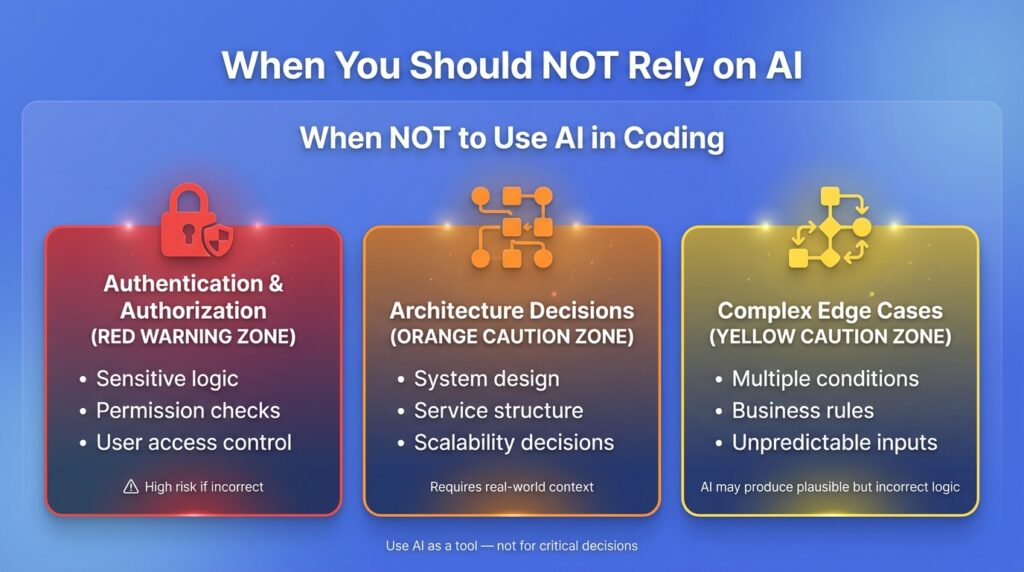
This section is the one most blogs skip. Here are the places where I actively avoid leaning on AI in my own projects.
Authentication and authorization logic. Too much depends on getting this right. AI can generate code that looks correct and passes basic tests but has a logic flaw in a permission check. These bugs are hard to find and expensive when exploited. I write this myself, then use AI to review it, not the other way around.
Architecture decisions. How you structure your codebase, how services communicate, how you handle data modeling at scale. These decisions have long consequences. AI does not know your traffic patterns, your team’s skill set, or your deployment environment. This is judgment work, not code generation work.
Complex edge-case logic. If a function has five or six conditional branches that depend on real-world domain rules, AI will give you something plausible but probably not quite right. The plausibility is the danger. It looks like it works until a real user triggers the edge case.
A useful mental check: if this code being wrong would cost you hours to debug or expose user data, write it yourself first.
How to Use AI Without Losing Your Coding Skills
This is the question I get most from students and junior developers, and it is the right question to be asking.
A few things that actually work:
Write first, then AI. Before you prompt, spend five to ten minutes attempting the problem yourself. Even if you get stuck, even if your attempt is wrong, the attempt primes your brain to understand the AI’s output better. You are not wasting time. You are building the context you need to evaluate what comes back.
Explain before you generate. Make yourself describe what you need and why, out loud or in writing, before you open Copilot or Cursor. If you cannot explain it clearly, you are not ready to use AI on it yet.
Do manual practice sessions. Deliberately code without AI for a few hours a week. Not because AI is bad, but because your reasoning ability needs repetition to stay sharp. Athletes do not stop doing drills just because they have better equipment.
Use AI as a teacher, not a ghostwriter. When AI generates something you do not understand, ask it to explain. “Walk me through what this useEffect cleanup function is doing and why.” That is a completely different use pattern than accepting and moving on.
Some educators and researchers have also raised concerns that over-reliance on AI tools can reduce deep learning and problem-solving retention if developers skip the reasoning process. Source: https://www.nature.com/articles/s41586-024-07132-9
The Hidden Risks Nobody Explains Properly
The security risk is real, and the numbers are worth knowing.
Even OpenAI has acknowledged that AI-generated code can be incorrect or insecure without human review, reinforcing the need for a strong human-in-the-loop approach. Source: https://platform.openai.com/docs/guides/code
Research published by Stanford and summarized by security teams at multiple firms found that developers who used AI coding assistants were significantly more likely to introduce security vulnerabilities than those who did not, particularly in areas like SQL injection protection, input validation, and sensitive data handling. Industry reports commonly estimate that roughly 40–48% of AI-generated code can contain security vulnerabilities if not carefully reviewed. [Source: https://snyk.io/blog/ai-code-security-risks/]
That is not a knock on the tools. It is a systems problem. AI is optimizing for functional code, not hardened code. Those are different goals.
Beyond security, there is a subtler risk: technical debt that looks clean.
AI-generated code is often readable and well-structured. That is actually part of the problem. Messy code signals to the team that something needs attention. Clean-looking AI code can accumulate logic problems, unnecessary complexity, or missed abstractions without anyone flagging it, because it looks fine on the surface.
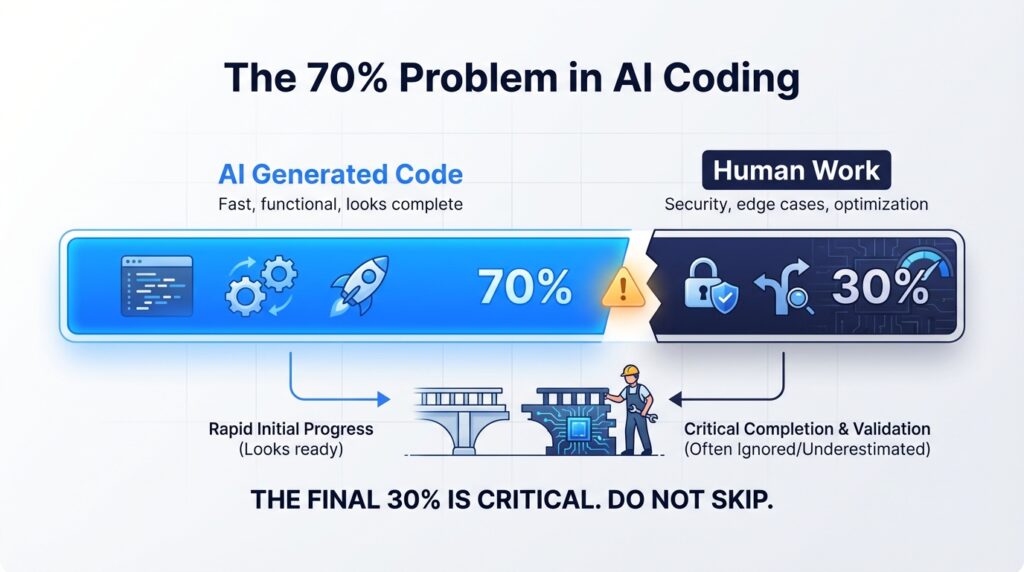
I call this the 70% problem. AI gets you to a working solution fast. The last 30%, the refinement, the security hardening, the edge-case handling, is still human work. If you mistake the 70% for 100%, you will pay for it later.
What Actually Makes a Great Developer in 2026
Syntax knowledge matters less than it used to. AI handles a lot of the boilerplate that used to separate experienced developers from beginners.
What AI cannot replace, at least not yet, is judgment. Knowing which architecture fits a problem. Knowing when a working solution is actually a liability. Knowing how to read a codebase built by three different people over two years and understand its real shape.
Those skills come from building things, breaking things, and fixing them. They come from understanding code, not just accepting it.
Industry data backs this up in an indirect way. GitHub’s research on Copilot has shown that developers can complete tasks up to 55% faster with AI assistance. But faster output is not the same as deeper understanding, and most studies do not measure long-term maintainability or debugging complexity. Source: https://github.blog/2023-02-14-github-copilot-research/
Most productivity studies do not measure what happens six months later when those developers need to debug, extend, or refactor the code they accepted.
My take, for what it is worth: the developers who will thrive are not the ones who use AI most. They are the ones who use it most thoughtfully. There is a real difference.
Final Framework: Use AI as a Tool, Not a Brain Replacement
Here is where I land after building real MERN projects with AI and watching students use it well and poorly.
AI is a force multiplier. It multiplies what you bring to it. If you bring strong fundamentals and clear thinking, it makes you significantly faster. If you bring gaps and unclear thinking, it just generates faster-looking gaps.
The practical version of this is simple:
- Stay at Level 1 or 2 on the dependency spectrum most of the time
- Write before you generate
- Review everything, especially security-adjacent code
- Do not let AI make your architecture decisions
- Use the five-step loop: Prompt, Generate, Read, Understand, Accept
The student I mentioned at the start? He understood JWT by the end of our session. Not because I lectured him, but because I made him read through the code AI had written and explain it back to me line by line.
That is the move. Not using AI less. Using it in a way that keeps your own thinking in the loop.
