

Let me be upfront with you: I am not a Silicon Valley engineer with a PhD in machine learning. I am a developer and a tutor who has been building MERN stack projects, teaching students, and genuinely testing out AI tools in the trenches, not just reading about them on Google. This guide is written the way I wish someone had written it for me two years ago: Honest, Practical, and Rooted in real experience. It doesn’t just have the wins, but the embarrassing mistakes too which cost me hours of wasted time. You will learn how to balance Creativity and AI for developers 2026.
Let’s get into it.
The Evolution of Programming: From Autocomplete to Autonomous AI Agents
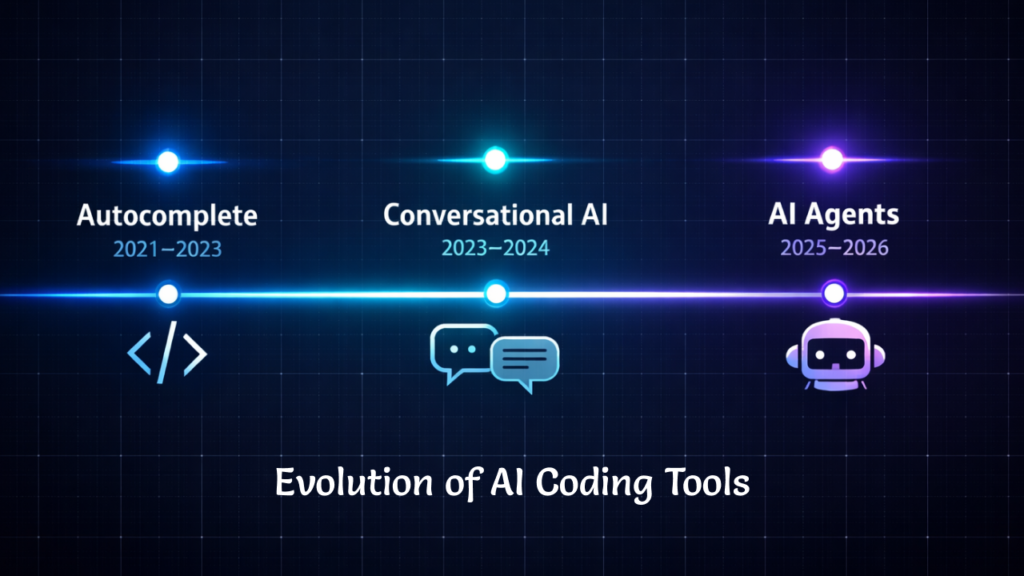
To understand where we are in 2026, you need to understand where we came from. AI coding tools did not arrive fully formed. They evolved in three distinct generations, from 2021 till today, each one fundamentally changed what developers expect from their tools and how they respond.
Generation 1: Autocomplete (2021 – 2023). When GitHub and Open AI jointly launched Github Copilot, developers reacted somewhere between amazed and skeptical. It could complete a function you had already started. It was fast and efficient. It was often wrong in subtle ways. But it felt like a supercharged IntelliSense. Just imagine a very clever autocomplete vscode extension that had read a lot of GitHub repositories.
Generation 2: Conversational Coding (2023 – 2024). During this time, AI evolved from the autocomplete to situations where developers started having conversations with AI like the ChatGPT from OpenAI and Claude from Anthropic. You could paste an error message and ask “why is this broken?” You could describe a feature and get a rough to nearly precise implementation back. I could actually feel that the workflow has shifted from typing to describing. This was genuinely new.
Generation 3: Agentic Development (2025 – present). This is the generation we are living in right now, and it is the most disruptive by far. In this era, tools not only just suggest code, they can plan and execute multi-step tasks. They are now able to create and open files, write across modules, run various tests, and loop back on errors if any. Nowadays, AI agents are not limited to a smart autocomplete but it’s more like a junior developer, who is confident and works very fast, occasionally making catastrophic mistakes.
This shift to agentic development is not just a product update. It changes how you think about architecture, file structure, and your own role in the codebase.
What Modern AI Coding Tools Actually Do (And What They Still Can’t Do)
One of the most valuable things you can do as a developer in 2026 is develop an accurate mental model of where AI genuinely helps and where it silently lets you down.
Here is a practical breakdown, earned from experience rather than marketing copy:
| Development Task | AI Capability |
| Code generation (boilerplate, CRUD) | ⭐⭐⭐⭐⭐ |
| Debugging known error types | ⭐⭐⭐⭐ |
| Refactoring isolated modules | ⭐⭐⭐⭐ |
| System architecture decisions | ⭐⭐ |
| Security and authentication logic | ⭐ |
| Product and UX decisions | Human-only |
The above table shows the capability of AI in various Development Tasks. From top to bottom AI is getting worse and worse.
I learned this lesson the hard way when I was setting up GatherKnow.com, my current website. I asked an AI to optimize the CSS for my hero section. It gave me a snippet that looked immaculate in the preview. What it gave me in production was a broken mobile layout, because it had used absolute positioning instead of Flexbox, completely ignoring the structural conventions of the theme. I spent two hours reversing the “AI magic” that had no awareness of the environment it was editing.
The lesson? “AI doesn’t know your architecture. Only you do”. I can confidently conclude that the more complex your development environment, the more you need to carefully review the AI output before applying it.
The AI Developer Stack in 2026
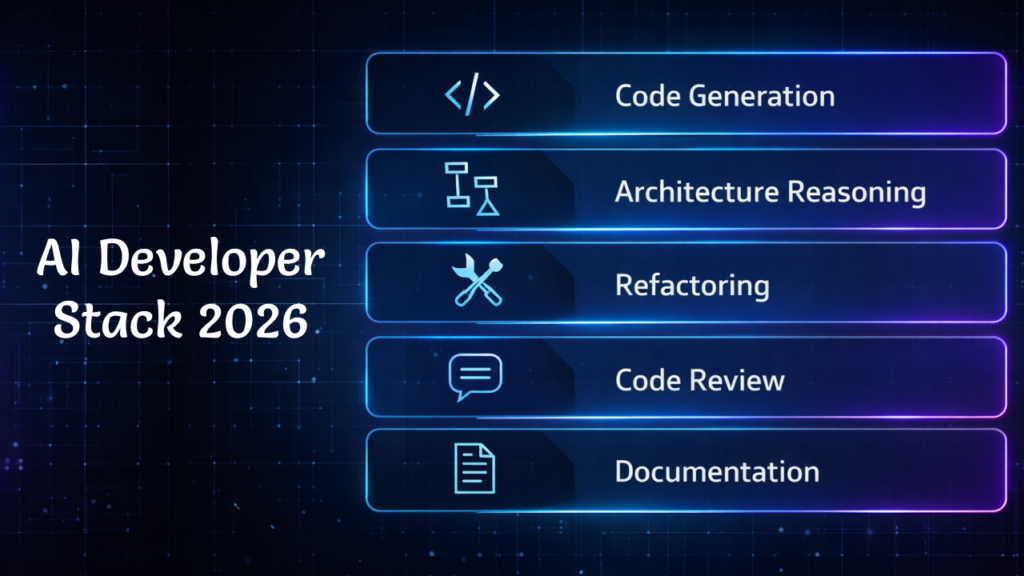
If you occasionally use AI in your browser for some random task, trust me you’re leaving a significant amount of productivity on the table. In this era where AI is evolving and getting better every single day, some smart developers are thriving right now, as they think in terms of an AI Developer Stack – a layered set of tools, each used for what it does best.
Here is what my AI Developer Stack looks like
| Layer | Tool Type | What It Does |
| Code generation | Copilot / Cursor | First-draft functions, boilerplate, API routes |
| Architecture reasoning | Claude / GPT-4 | Design discussions, trade-off analysis |
| Refactoring | AI IDE (Cursor, Windsurf) | Restructuring existing code modules |
| Code review | AI PR reviewer | Catching regressions and style issues |
| Documentation | LLM assistant | Generating JSDoc, README sections |
Here is the stack I have settled into:The important thing to notice is that no single tool does everything. For Example, Copilot is excellent at inline suggestions but it’s not where I go for understanding the database schema. Claude is excellent at thinking through architecture trade-offs but I won’t use it to complete my fifty individual functions. Using the right tool for the right layer is what separates a productive AI workflow from a frustrating one.
When Developers Should NOT Use AI
I’ll be honest with you, this is the most left out section that articles don’t talk about, and I’m gonna be direct about it.
As far as I’ve used AI, I can confidently say that AI is definitely useful in coding, but AI-generated code can sometime becomes a nightmare, as it isn’t always safe to rely on, especially where it may produce incorrect code which is unreliable and when it produces code that looks correct but it contain hidden security flaws, which makes it dangerous.
I’m not saying this to criticize AI capabilities but I’m saying this because I personally learned it the hard way, as some tasks are too sensitive to blindly trust AI-generated code.Being more specific, I used and deployed AI-generated code that has lacked proper authentication checks, SQL Injection risks, ignorance of the performance optimization etc. I faced it a lot while developing my personal projects.
These are the scenarios I would suggest you not to trust AI blindly instead be extra careful:
Do not trust AI for these:
Authentication logic: JWT handling, session management, OAuth flows. The logic gaps here can be devastating. Here is what I experienced:
I was teaching one of my students how to secure a Node.js API when the AI suggested middleware for JWT verification that looked perfectly structured. Example of the type of mistake I mean:
if (!token || verifyToken(token)) {
      next();
}
This might accidentally allow any request with any token to pass.
The above code looks perfect but the problem was a logical OR (||) operator in the wrong place. In reality, it allows any request with any token to pass a validation check, which nobody wants. If I had not manually tested that specific route with Postman, we would have shipped a wide-open back door into the application, breaching the integrity.
Correct logic would normally require both checks:
if (token && verifyToken(token)) {
      next();
}
The difference is tiny, but the impact is massive.
The AI had perfect syntax but the logic was completely broken and that is exactly what I want you to carefully check.
Cryptography: Hashing, encryption, key management, token generation. These are domains where being almost right is the same as being completely wrong. I’ve noticed that sometimes AI may:
- Store keys incorrectly
- Use weak hashing algorithms
- Generate predictable tokens
- Misuse encryption modes etc.
Hence, a tiny mistake can break the entire security model of your application.
Production security: Input sanitization, SQL injection prevention, rate limiting, XSS protection. Here, AI will often give you the commonly seen pattern, not the correctly implemented and secured one. For example:
Wrong approach:
db.query(`SELECT * FROM users WHERE email = '${email}'`)This allows SQL injection.
Secure approach:
db.query("SELECT * FROM users WHERE email = ?", [email])Both of them work fine but the above one isn’t secure.Performance – Critical Algorithms: Whenever I need to work with time complexity, memory allocation or runtime behavior under high load / traffic, I’ve seen AI ignores the efficiency and often provide you with the readable solution, not the efficient one. At small scale it’s fine and ignorable but at large scale it may result in server slow down, memory spikes or worst case APIs fail under load.
The point I want to make here is that AI is great at syntax. Humans are responsible for logical integrity. These two things may sound similar but they are completely different. You should always test security-related logic manually, independently, and skeptically. As I already told you, treat AI like a junior developer, who is helpful, productive but its code always needs a review.
The Hybrid Coding Workflow: Human + AI Collaboration
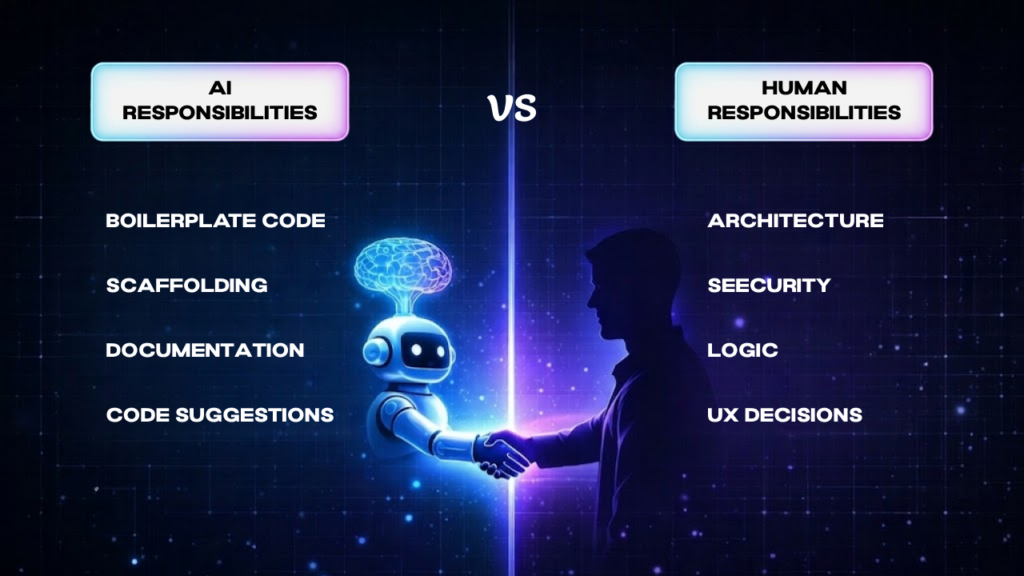
I have discovered the most useful mental model by working with AI so far is that instead of thinking:
“AI writes the code, I quickly check it”
You should think:
“AI and I are both collaborators with different strengths, each responsible for the specific part of the process”.
This mindset model is similar to pair programming or for the sake of better framing: “AI Pair Programming”, two different collaborators with complementary strengths. This practice is also common in software development known as Agile Model and Extreme Programming. Here both collaborators are responsible for their own specific part of the development process.
Here is the loop I use in my practice:
- AI generates scaffolding: I describe the features, the requirements and the AI generates the structure. It creates all the skeleton which needs to be filled with the real requirements, not just what AI gave you.
- The developer reviews the architecture: Before a single line runs, I check if the scaffolding is compatible with my codebase. Does it follow my folder structure? Does it reinforce my weak code logic? Is the data flow correct? I use Claude, and Deepseek.
- AI refactors individual modules: Once the architecture is confirmed, instead of copy-pasting the entire files of code without thinking twice, I ask AI for small specific and contained pieces of code that keeps me in control of the program logic.
- The developer handles edge cases and logic: This part is too sensitive for AI to trust on. As I already told you, AI-generated code for these domains can sometimes be a nightmare for your application, authentication, validation, error states, and security. So I wrote it myself.
- AI writes documentation: JSDoc comments, README sections, inline explanations for complex blocks. Honestly, this is where I use AI the most. I like its perfect structure and perfect grammar. So definitely use AI for Documentation, my favorite one is ChatGPT.
Let me tell you about the night I almost deleted my career. I was working on SecurityGatekeeper (Details are here) and I got a bit too confident so I thought, ‘It’s 2026, why am I refactoring this manually?’ I literally dragged the entire folder into the AI agent and said, ‘Clean this up!’
Big mistake!
Five minutes later, my terminal looked like a Christmas tree made of red error messages. The AI had renamed the core engine of my application but it forgot to update it in the different locations of the different files. It was like a total cross-contamination nightmare. I spent the next four hours – fueled by cold tea and pure regret – untangling the mess so I called it “THE AI MAGIC”.
The Lesson: AI is a scalpel, not a bulldozer. If you give it the whole forest, it’ll cut down the wrong trees. In 2026, your value as a dev isn’t just knowing how to prompt; it’s knowing how to isolate tasks so the AI doesn’t mess your existing code.
My Quick Fix for Context Drift:
- Backup first: Always have a clean Git commit before an AI refactor. It’s also better to make a copy on the local device.
- Atomic Prompts: Feed the AI with only one file or one function at a time, instead of large file dumps.
- The ‘Verification Loop’: Run tests after every AI-suggested change, not at the end. This will ensure your code is working properly.
Prompt Engineering for Developers (Advanced)
Most developers have heard that “be specific in your prompts.” I think it is good advice, but it is too vague and it lacks a lot of details to be actionable. However, I figured that out myself, you know, like the “Trail and Error” Method. I have mastered some useful prompts that will definitely help you, as these prompt frameworks have made a solid difference in my workflows:
1. The Spec Prompt (for new features)
I use this prompt when I want AI to generate new functionality or scaffolding. The goal is to give it enough context that it does not have to guess about the stack or architecture.
Context: [describe your stack and relevant files]
Task: [describe specifically what you need built]
Constraints: [list conventions, naming patterns, anything it must respect]
Output: [specify what format you want the response in]
For Example, Instead of asking:
“Build an API route for user authentication.”I give the AI structured instructions like this:
Context:
MERN stack application using Express and MongoDB.
Authentication middleware already exists in `/middleware/auth.js.`

Task:
Create an Express route for creating a new note. The route should only allow authenticated users.

Constraints:
Follow existing folder structure. Use async/await.
Return responses in JSON format.

Output:
Provide the route handler and example request/response format.
I experienced dramatic improvement in the reliability of AI-generated code because it forced the AI to operate within my project’s architecture rather than creating its own assumptions. By mentioning my specific file path (/middleware/auth.js), I’m essentially ‘anchoring’ the AI to my reality. It can’t suggest a random library if I’ve already told it what I’m using.
2. The Refactor Prompt (for improving existing code)
I use this when my coding is working but I want to be cleaner, more readable, and more efficient than my existing one, or to achieve the best practices.
Here is an existing function: [paste code]

It works, but [describe the specific problem].

Refactor it to [specific improvement goal].
Do not change the function’s external behavior or its return shape.
Key Tip: Always include the constraint: “Do not change the function’s external behavior or its return shape.” Without that last constraint, AI will often ‘improve’ your code by changing an Object to an Array or a String to a Number, which breaks everything downstream.
3. The Debug Prompt (for error analysis)
I use this when I face an error I cannot immediately explain.
I am getting this error: [paste error]

Here is the relevant code: [paste code block, not the whole file]

Here is what I have already tried: [list your attempts]
What is likely causing this, and what should I test next?
Telling it what you have already tried prevents it from wasting your time suggesting the obvious fixes you already ruled out (like: Did you restart the server? Or etc.)
In the beginning it took me a lot of time fixing those AI inconsistencies and sometimes it took longer than writing the code myself. But with trial and error I’ve figured out these prompts. Once I started using structured prompts like this, the AI outputs became far more aligned with my actual codebase.
Security Risks of AI-Generated Code
This section deserves more attention than it typically gets. Early on, I used to copy paste AI-generated codes as it seems so clean and perfectly structured, not knowing about the security risks it may cause.
As a result, I started to notice some flaws in my code, like I noticed similar and predictable patterns and weak sanitization of the inputs leading to SQL injections and XXS etc. I learned the hard way that “syntactically correct” does not mean “secure.”. Here are the specific 2026 risks you need to watch out for:
1. Insecure dependencies.
AI will suggest packages confidently, but its training data has a cutoff. It might suggest a library with an unpatched CVE (Common Vulnerabilities and Exposures) from last month.
The “Malware Trap”: In 2026, we are seeing “Hallucination Squatting.” Attackers find common fake names that AI agents hallucinate and then register those names on NPM with malicious backdoors. If you npm install a hallucinated suggestion, you’re pulling malware directly into your dev environment.
Pro Tip: Always audit your
package.jsonafter an AI-assisted build session.
2. Hallucinated APIs and the “React2Shell”.
AI models trained on older data might not be aware of critical 2026 flaws like CVE-2026-23864 (React2Shell), which affects React Server Components. If the AI suggests a serialization pattern from 2024, it might inadvertently leave your MERN app vulnerable to Denial of Service (DoS) attacks that can spike your AWS/Vercel bill in minutes.
3. Outdated Security patterns.
Security evolves fast. An AI trained on 2023–2024 data might suggest bcrypt configurations or JWT storage patterns (like keeping tokens in localStorage) that are now considered insufficient. In 2026, we favor more robust Permission Models and “Secure-by-Design” principles that older AI simply doesn’t prioritize.
4. Permission Model Bypasses
With the new Node.js 25.x security updates, there are specific ways to handle filesystem permissions (–allow-fs-read). AI often suggests “lazy” code that bypasses these protections using symlinks, creating a massive security gap in your production environment.
The Golden Rule I Follow: Treat AI-generated code like a Pull Request from a talented but “junior” developer who doesn’t understand security. You wouldn’t merge their code without a line-by-line review; don’t do it with the AI either.
Read more: OWASP Top 10 security guidelines
Will AI Replace Developers?
This is the question that drains a huge amount of internet energy. I want to give you a practical answer from my perspective rather than a philosophical one, as a developer who has been analyzing the market to answer questions like these here is what I think.
According to industry reports from GitHub, over 70% of developers now use AI-assisted coding tools in their workflow.
AI is already replacing specific tasks. If your workday is 80% boilerplate generation, repetitive CRUD operations, or writing basic test cases, then YES! AI is coming for that part of your job. In fact, it’s already here. But replacing a task is not the same as replacing a developer, AI will assist a developer to do basic tasks as I mentioned above, buying him more time for logical integrity of the application, business specific requirements and it will allow them to do it much more quickly and efficiently.
What AI is not replacing is the set of skills that require judgment, context, and accountability. System architecture. Trade-off analysis. Understanding why a feature should or should not be built a certain way. Knowing when an elegant technical solution creates a terrible user experience.
One of my friends, who is learning MERN Stack recently, built a full MERN CRUD application with amazing UI and complete logic, in around ten minutes. It was impressive, honestly. It looked like a project that would have taken a few hours if it was built by manually writing each line of code.
But when I asked him: “Why did the AI use a 201 status code here instead of a 200, and what does that mean for the frontend?” he went silent. He knew how to instruct the machine, but he didn’t understand what the machine had built. This lack of understanding is dangerous for real-world production.
As systems become more complex and interconnected, relying on code you can’t explain will lead to a catastrophic production failure.
Pro Tip: The developers who resist AI or the ones who delegate everything to it are out of the race. The Developers who will thrive are the ones who understand both code and use AI to accelerate the production and can actually fix when it fails.
The Future Developer Skillset (2026–2030)
I wish someone told me this before I started too. If you are a student or a junior developer wondering about where to invest your learning energy, here is my honest advice: The “Syntax-first” era is fading, a new set of high-value skills is taking its place, these skills will compound in value as the AI gets even better.
1. Context & Workflow Engineering (also called: Prompt Engineering):
It’s not just about “writing good prompts” anymore. It’s about understanding how to structure multi-step AI workflows. You need to know how to chain prompts together so that the output of one (like a Database Schema) feeds perfectly into the next (the API Controller).
2. Architectural Literacy (System Design):
As AI handles more implementation details, the “Grunt Work”, the ability to design at the architectural level becomes even more valuable. The developer who can sketch out a scalable, secure system and then use AI to build it will be extremely valuable, leveling him up to the Architectural level.
3. The Art of “AI Debugging”:
This is an emerging skill that barely existed two years ago. It means knowing how to identify the “context drift”, where in an AI-generated workflow an error was introduced, and how you can prompt your way back to a correct solution without starting over. This is genuinely the most worth learning skill.
4. Multi-model Orchestration:
In 2026, we don’t just use one AI. We use a Stack.
- Claude: for high-level reasoning and complex logic.
- GitHub Copilot for inline code completion.
- DeepSeek or ChatGPT are specialized agents for heavy-duty security audits and documentation.
Knowing which tool to pick for which task is the judgement that comes from experience, It’s the mark of a modern Senior Developer.
5. Logic Verification (The “Human Audit”):
This is perhaps the most underrated skill in AI-assisted development. This is an ability to read AI-generated code critically, understand its logic, and identify the subtle error that syntax-checking will never catch. Remember my JWT middleware story? The code looked perfect, but the logic was an open door.
My Advice: Don’t just learn how to code; learn how code works. The AI can do the “how,” but you must own the “why.”
Practical AI Workflow Example: Building a MERN App in 2026
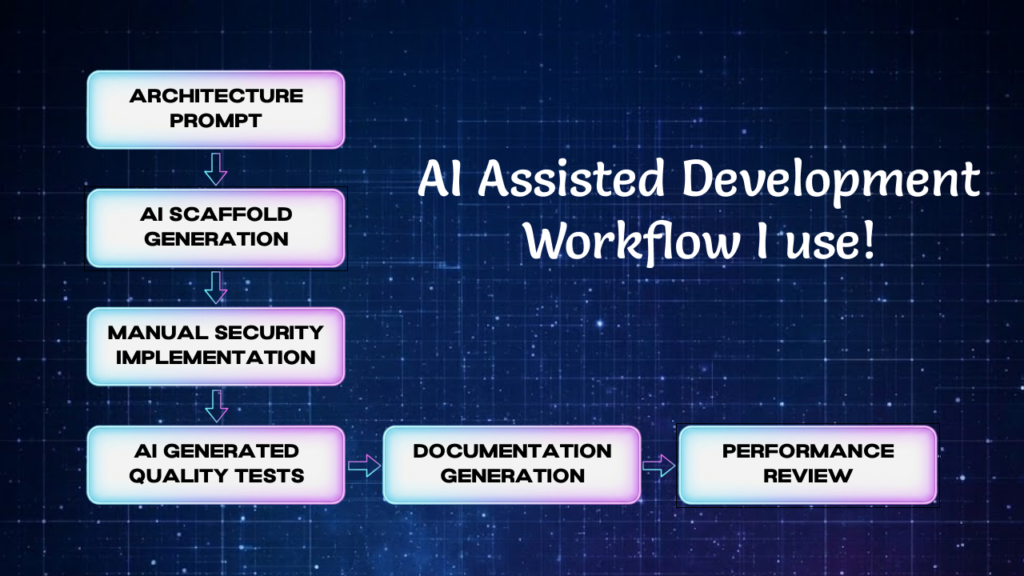
Let me give you a real-world and practical example. Here is how I actually use AI when building a new feature in a MERN stack application. Suppose I’m Building an Authenticated note-taking API. Instead of dumping a single giant prompt, I use a six-step “Human-in-the-Loop” workflow.
1. Architecture prompt (The Blueprint)
I start with a reasoning model like Claude 4.6 or GPT-4o. I describe the feature and ask for a proposed route structure and Mongoose data model. Notice, I do not ask for code yet. I want to review the architecture before any code implementation happens.
2. Scaffold generation
Once I am happy with the structure, I move to an inline AI tool like Copilot, you can use Cursor for it too, to generate the Express route handlers and Mongoose schemas.
Pro Tip: To prevent “Context Drift” I mentioned earlier, I keep this scoped to one file at a time.
3. Manual middleware:
I write authentication and authorization middleware myself. As we know what happened with my student’s JWT error, I don’t delegate security logic. I test every auth route manually with Postman or Insomnia before moving on to the next step.
4. AI-Generated Tests (The Quality Check)
Once the routes work correctly, then it’s time to ask AI to generate a Jest or Vitest test suite. Why? My Strategy is to force the AI to write Real Tests (e.g., What happens if the token is expired? What if the database is down? etc.). I review these carefully to ensure they are testing logic and real behavior, not just syntax.
5. AI-generated documentation
This is where I use AI with zero risk. I use it to generate JSDoc for the controllers, a README section for the API routes. This is where AI genuinely saves a lot of time with minimal risk.
6. Manual performance review
Finally, I check the query patterns. AI often writes functionally correct queries that are “quietly expensive.”
For example: An AI might forget to add a MongoDB Index on a field used for filtering. I manually review the explain() plans for my queries to ensure they scale.
The Summary: This workflow is deliberate and slightly slower than letting an autonomous agent run wild. But because I was involved in every step, I understand the “Why” behind the code. When a bug appears at 11 PM, I don’t have to spend hours reverse-engineering a bot’s logic, I already know how it works.
How I Use AI in My Daily Development Workflow
Here is the honest version of my day-to-day. I think the idealized “automated” workflow guides leave out the most important part: the human who has to live with the code.
I start most features with a conversation, usually with Claude, where I talk through the architectural design. I’m not asking for the code yet; I’m just “thinking out loud” with a tool that can push back and ask clarifying questions.
This stage catches more architectural problems than any other part of my process.
When I move to implementation, I use Cursor, sometimes Github copilot for its inline suggestions and its ability to edit across related files in a controlled way. I have learned to open one file at a time when using agents, as I already faced the incident I told you about, the SecurityGatekeeper incident, where a bot “refactoring back-fired” my project into chaos.
I have also gotten much more intentional about UI decisions. When I built an Agency Website for one of my clients, I used AI to generate the initial layout and component structure.
- The Result: It was technically correct. Clean CSS grid, proper contrast ratios, sensible spacing system.
- The Real Problem: It felt robotic and lifeless. The shadows were mathematically consistent but visually flat.
I ended up spending a focused afternoon adjusting micro-details by hand – softening the shadows, tweaking the borders and adjusting the UI – until the interface felt like something a real person would want to use.
Pro Tip: AI can handle mathematics better than you. You should focus on the emotion of the product. That distinction has become one of my core principles for working with AI tools. The math is delegatable but the vibe is not.
Frequently Asked Questions
Since I started building with these tools, these are the eight questions I get asked most often. I want to give you the honest answers, not the marketing hype.
1. Will AI replace software developers?
AI wont replace developers as a profession, but it is absolutely replacing specific tasks within that profession. The developers who invest in architecture thinking, system design, and the ability to verify and debug AI-generated code will find their value increasing. The ones who only know how to generate code without understanding it are in a more precarious position.
2. What is the best AI tool for coding in 2026?
There is no single best tool, which is the honest answer and also the useful one. GitHub Copilot and Cursor are strong for inline code completion and IDE-integrated workflows. Claude and GPT-4 are better for architectural reasoning, complex debugging, and written explanation. The best developers use a combination, understanding what each one does well.
3. How do developers actually use AI in real projects?
The most effective pattern is Modular and Deliberate:
- AI for scaffolding and boilerplate
- human review for architecture and logic
- AI for documentation and tests
- human review before anything security-related ships.
The key word in every step is Review. Passive acceptance of AI output is where most real-world errors originate. As a developer in 2026, your primary job has shifted from “Writer” to “Editor-in-Chief.”
4. I’m a student, should I stop “memorizing” syntax now as AI can write it?
This is a trap many of my students fall into. My advice: No. You still need to “memorize” the core concepts of how code works. If you don’t know what a Promise is or how a map() function behaves, you won’t be able to spot when the AI is writing inefficient or buggy code. Think of it like a calculator, you still need to learn long division to understand how numbers work, even if the calculator does the work for you. Understand the logic, delegate the typing.
5. How do I handle “AI Context Drift” in a large MERN project?
As your project grows, the AI starts to “forget” your earlier architectural choices. To overcome this, I recommend keeping a SPEC.md or a SystemDesign.txt in your root folder. Every time you ask a tool like Cursor or Claude to build a new feature, feed it that file first. This keeps the AI aligned with your existing codebase and naming conventions, preventing it from suggesting code that doesn’t fit your project.
6. Is it “cheating” to use AI for my portfolio projects?
If you are using AI to generate the entire project and you can’t explain how the authentication flow works, then yes, you are cheating yourself. But if you are using AI as a Senior Pair Programmer, asking it to explain patterns, refactor your messy logic, and generate boilerplate, then you are just being efficient.
My Rule for Portfolios: If you can’t walk an interviewer through every single line of code and justify why it’s there, don’t put it in your repo.
7. How do I stop AI from suggesting “lazy” security fixes?
AI loves the “path of least resistance.” If you ask it to fix a CORS error, it might suggest origin: ‘*’, which is a massive security hole. My advice is to constrain your prompts. Instead of saying “Fix this error,” say “Fix this error while following the OWASP Top 10 security guidelines.” By forcing the AI to consider security constraints from the start, you get professional-grade suggestions rather than “quick and dirty” fixes.
8. Will using AI make me a “lazy” developer in the long run?
Only if you let it. If you use AI to bypass thinking, your skills will atrophy. But if you use AI to deepen your thinking, by asking it for different ways to solve a problem and then researching why one is better than the others, you will actually become a better developer faster. I always say that use AI to explore the “Why,” not just to get to the “Done.
Final Thoughts: The Human Advantage in 2026
If you’ve made it this far, you’ve seen the “good, the bad, and the terminal-full-of-red-errors”, hence the real side of AI-assisted development.
The biggest lesson I can leave you with as a developer is this: The tools will only get faster, but the logic remains your responsibility. Don’t be afraid to let AI do the heavy lifting, but never let it do the heavy thinking. Whether it’s the security of your JWT flow or the “vibe” of your CSS shadows, your human touch is the only thing that makes a product worth using.
Build projects. Break them. Let AI help you fix them. But always, always keep your hands on the steering wheel.
Found this useful? GatherKnow is where I document what I actually build, test, and teach, not just what sounds good in theory. Follow along for more proof-of-work development content.
