

I want to be upfront about something before we start: I’m not a senior engineer at a big tech company. I’m a dedicated and loyal MERN stack developer, I use JavaScript on the frontend, React for UI, and I’ve been working on PHP for the backend too. I also helpout beginner developers and regularly review their code as part of that and I write about what I actually go through while building things.
So when I say I use Claude for code review, I mean I use it the way someone at my level actually would, not the polished, “I have 10 years of experience and I know exactly what I’m doing” way. The messy, iterative, “why did it say that?” way.
And that’s exactly why I think this article will actually help you. If you don’t know what I’m about to write on, just keep reading and you won’t regret it.
Table of Contents
Who This Is For (And Who It’s Not)
This article is for you if:
- You’re a beginner or intermediate developer actively using Claude but feeling like the feedback you get is too vague to act on
- You’re learning JavaScript, React, PHP, or any web stack and want AI to actually help not just sound helpful
- You’ve tried AI code review before and thought “okay but… is this actually right?”
This article is NOT for you if:
- You’re looking for a list of copy-paste prompts with no explanation
- You already have a solid senior dev reviewing your work honestly, that’s still better than any AI workflow
Why Most Claude Code Reviews Are Useless
Here’s the uncomfortable truth: the first 20-something times I tried using Claude to review my code, I got almost nothing useful back.
I’d paste a JavaScript function and type something like:
“Can you review this code?”
And Claude would respond with something like:
“Great code! Here are a few suggestions: add comments for clarity, consider error handling, and make sure to test edge cases.”
That’s not a code review. That’s a motivational poster.
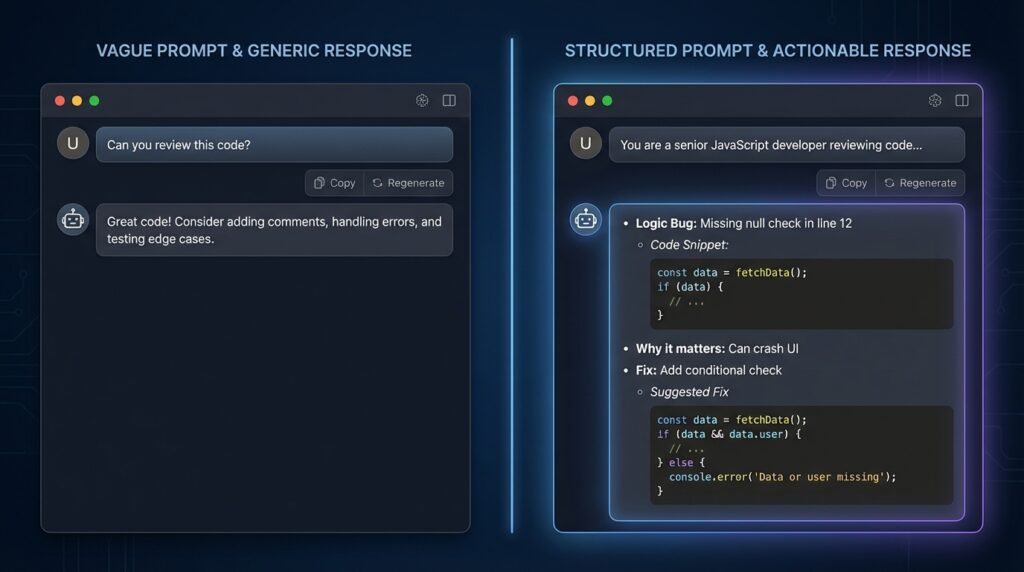
The problem wasn’t Claude. The problem was me. I was asking a vague question and getting a vague answer. It’s like going to a doctor and saying “I feel bad” and expecting a specific diagnosis.
The failure was in my prompting and I had to learn that the hard way by getting burned by it a few times, once when I was helping a student debug a React component and I showed them Claude’s “review” as if it were actually useful. The student noticed the feedback was too generic. That was embarrassing, and it pushed me to actually figure out how to prompt properly to get what you REALLY NEED.
My Actual Code Review Workflow (Not Just Prompts)
Before I show you the prompts, let me show you the process because prompts without a workflow are just fancy copy-paste.
Here’s what my actual flow looks like now:
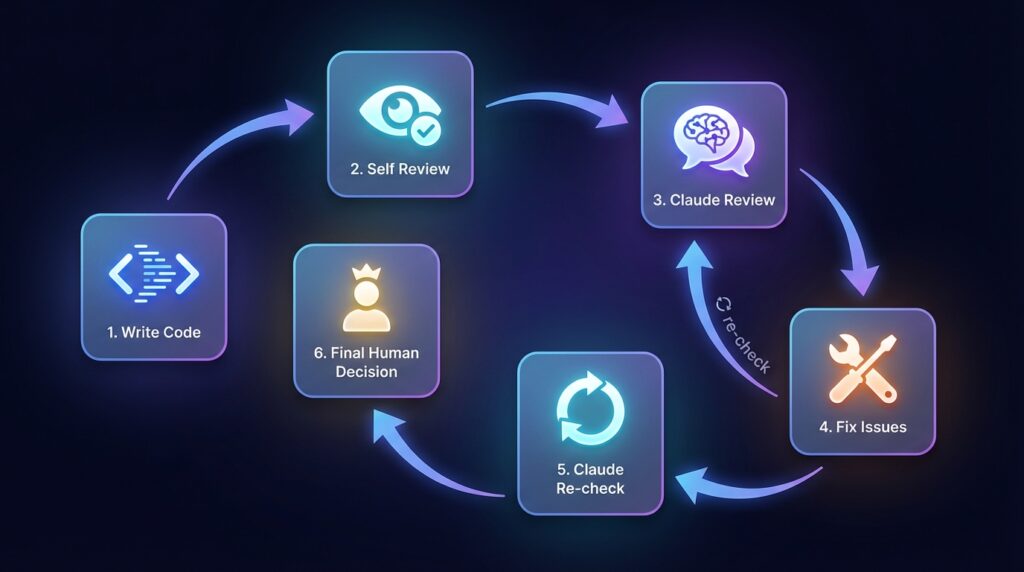
Step 1: Write the code. I write it based on what I know without AI involved yet.
Step 2: Self-review first. I read through it myself and note anything I’m unsure about. This matters because if I skip this step, I end up offloading my thinking to Claude instead of using it to fill gaps.
Step 3: First Claude pass. I send it to Claude with a structured prompt (more on this below). I’m looking for specific issues not “suggestions.”
Step 4: Fix what makes sense. Not everything Claude says is worth acting on. I filter it through my own judgment.
Step 5: Claude re-check. After fixing, I send the updated code back and ask Claude to verify the changes resolved the issues it flagged.
Step 6: Final human judgment. I ship based on my own understanding. Claude doesn’t get the final vote. I do.
This is important: Claude is an assistant in this workflow, not the authority. The moment you flip that, you’re in trouble. This workflow may look lengthy but it isn’t actually once you work with it, it makes you efficient.
The Prompt That Changed Everything (v1 → v3 Evolution)
Let me show you exactly how my prompting evolved, with real outputs at each stage.
v1 Prompt (weak):
“Review this JavaScript function.”
Output: Generic. Mentioned comments, error handling, and testing. Nothing about the actual logic mostly useless.
v2 Prompt (better, but still missing things):
“You are a senior JavaScript developer. Review this function and tell me if there are any bugs or performance issues.”
Output: A bit better. Claude pointed out that I wasn’t handling the case where the array could be empty, and flagged a potential issue with my .map() return (just an example). Still felt surface-level though.
v3 Prompt (what I actually use now):
“You are a senior JavaScript developer reviewing code for a junior dev in a real project. The function below handles user authentication state in a React app. Review it for: (1) logic bugs, (2) security issues, (3) edge cases I may have missed. For each issue, tell me: what the problem is, why it matters, and what a fix looks like. Separate confirmed issues from things that might be issues depending on context. Do not rewrite the entire function, only flag problems.”
Output: Claude gave me three specific issues, each with a clear explanation and a small targeted fix. It also separated two “possible issues” and said they depended on how the function was being called elsewhere.
That’s a real code review.
The difference between v1 and v3 isn’t just wording. It’s structure. I gave Claude a role, a context, a task with clear sub-questions, and a format constraint. That’s what makes the difference.
Real Example: How Claude Actually Reviewed My Code
Let me make this concrete. Here’s a real React function I wrote while building a small authentication flow. It had a bug I genuinely missed on my own.
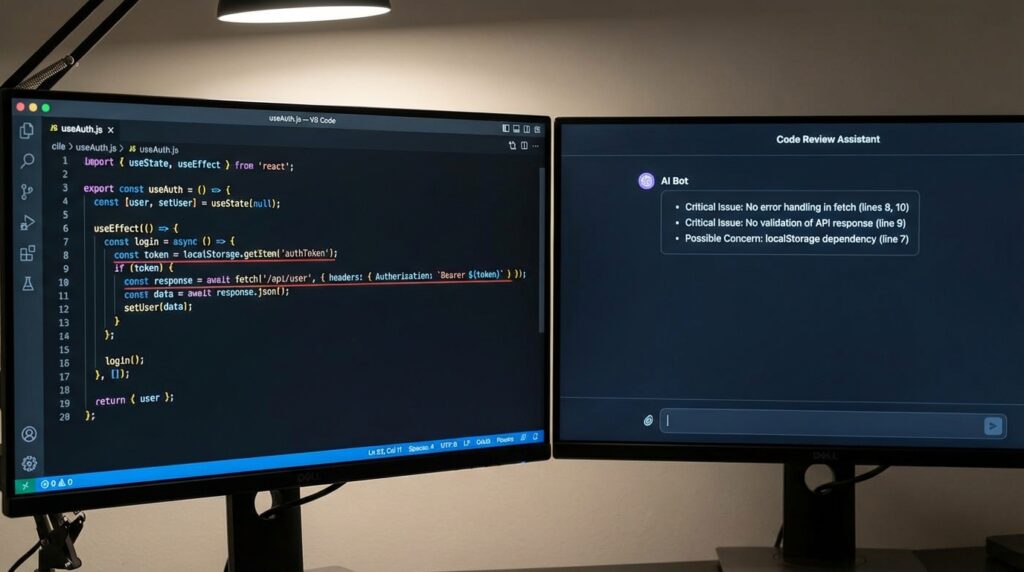
// useAuth.js
function useAuth() {
  const [user, setUser] = useState(null);

  useEffect(() => {
    const token = localStorage.getItem("token");
    fetch("/api/me", {
      headers: { Authorization: `Bearer ${token}` }
    })
      .then(res => res.json())
      .then(data => setUser(data));
  }, []);

  return { user };
}
The prompt I used (v3 style):
“You are a senior React developer reviewing code written by a junior dev. This custom hook fetches the authenticated user on mount using a token from localStorage. Review it for: (1) logic bugs, (2) security issues, (3) unhandled edge cases. For each issue, state the problem, why it matters, and a short fix. Separate confirmed issues from possible concerns. Do not rewrite the hook.”
What Claude flagged:
Critical: No error handling on the fetch call. If the network request fails or the token is expired, setUser never gets called with an error state, the component just silently gets null and the UI has no idea why.
Critical: No check for whether data is actually a valid user object. If the API returns { error: "Unauthorized" }, setUser gets called with that error object instead of a user which would break any component reading user.name or user.email.
Possible concern: Reading from localStorage directly inside the hook means it’s harder to test. Depends on whether testability is a concern here.
What was actually correct: Both critical issues were real. The first one I already suspected but told myself “I’ll handle it later.” The second one I genuinely hadn’t thought about, I assumed a failed request would just return null. It doesn’t.
What I fixed: Added a .catch() block and checked data.id before calling setUser. Two lines. Claude didn’t rewrite anything it just pointed at what was broken and why.
That’s the kind of review I couldn’t get with a vague prompt. (If you want to go deeper on structuring prompts for development tasks, see our [Advanced Prompt Engineering Guide] on GatherKnow.)
My “Senior Engineer” Prompt Template (Breakdown)
Here’s my go-to template now. But more importantly, here’s why each part exists.
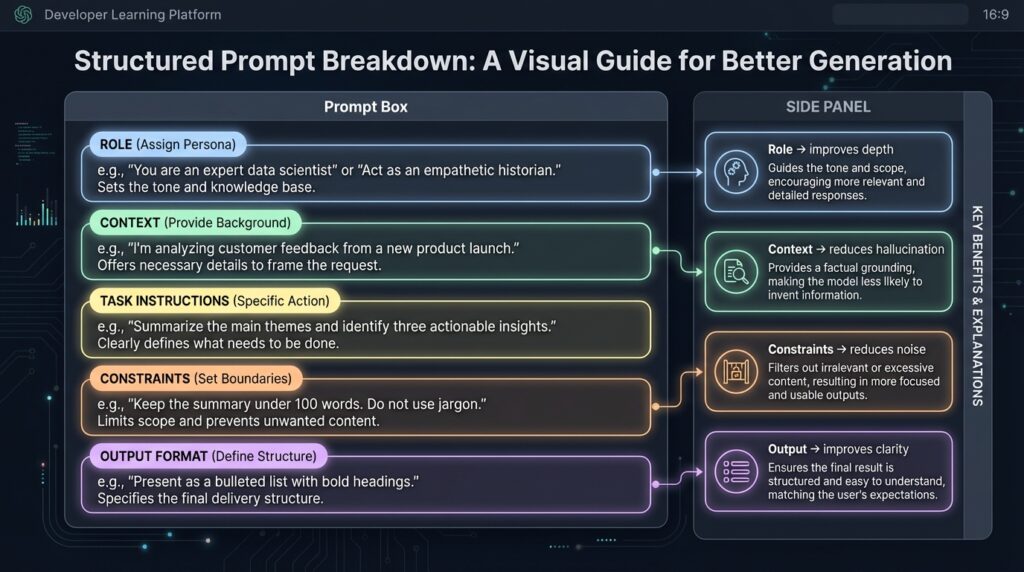
You are a senior [language/framework] developer reviewing code written by a junior developer.

Context: [What does this code do? What's the project? What stack?]

Review this code for:
1. Logic bugs or incorrect assumptions
2. Security vulnerabilities (if applicable)
3. Edge cases not handled
4. Readability issues that would slow down future devs

For each issue:
- State the problem clearly
- Explain why it matters (not just that it's "bad practice")
- Suggest a fix (short snippet, not a full rewrite)

Separate confirmed issues from "possible issues depending on usage."
Do not add suggestions unless asked. Focus only on problems.
Why “senior developer” role? It’s because the Claude adjusts its output based on the role. When I tested without the role, the feedback was more surface-level and generic, with a senior dev framing, it pushes harder on edge cases and security.
Why “junior developer reviewing”? It sets the expectation that explanations need to be clear, not just technically correct.
Why “separate confirmed vs possible”? without this Claude mixes genuine bugs with speculative concerns. That separation helps me prioritize.
Why “do not add suggestions unless asked”? Claude will naturally try to be helpful by adding style improvements, refactoring ideas, etc. I don’t want noise, I just want signal.
How I Force Claude to Give Real Feedback
There are a few specific techniques I’ve found that push Claude past generic output:
The “Evidence Required” rule: Add this line: “For every issue you flag, quote the specific line or lines from the code that cause it.”
This forces the Claude to stay anchored to the actual code instead of floating into general advice.
The “GitHub comment” format: Add: “Format your output as if you were leaving inline code review comments on a GitHub pull request.”
This changes the tone of the output entirely. It becomes more specific and direct, because GitHub comments can’t be vague they have to point to something.
The “No praise” rule: Add: “Do not tell me what the code does well. Only tell me what needs fixing.”
This saves time and removes the filler that makes reviews feel like participation trophies.
Common Mistakes That Ruin AI Code Reviews
These are mistakes I’ve made personally and that I’ve seen my students make when they start using AI tools.
1. Over-trusting the output.
Claude sounds confident even when it’s wrong. It once told me a certain approach was a “security risk” in a context where it absolutely wasn’t. I know that now because I looked it up. At the time, I almost refactored working code based on bad advice. This is a well-documented issue with LLMs they can generate plausible-sounding but incorrect explanations, especially around security and async behavior
(Source: Anthropic model card, limitations section).
For a broader look at which AI tools are actually worth using in a dev workflow, see our Best AI Coding Tools comparison on GatherKnow.
2. Asking vague questions.
As I’ve already covered this, but it’s worth repeating:
“The quality of the output is almost entirely determined by the quality of the input.”
3. Letting AI refactor everything.
Claude loves to offer rewrites. Don’t accept them blindly. Refactoring is a big decision. It can introduce new bugs. It’s better to understand what it’s changing before you apply it.
4. Ignoring your own context.
Claude doesn’t know your project’s constraints, your team’s conventions, or your deadline. It reviews code in a vacuum. You have to apply its feedback through the lens of your actual situation.
When Claude Gets It Wrong (And How I Catch It)
It’s not something I should be hiding: “Claude makes mistakes”. Here’s how I’ve caught them.
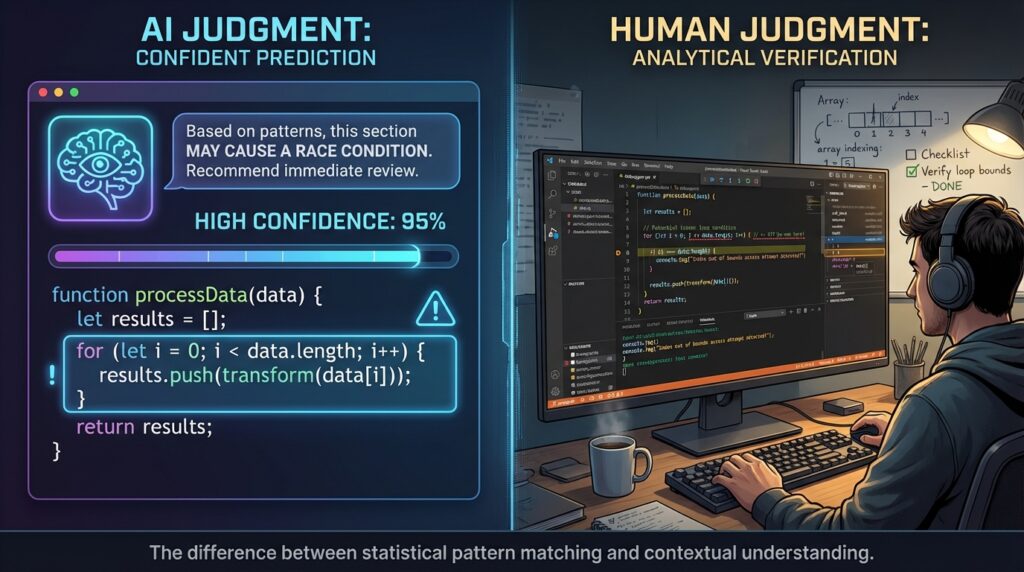
False positives: Claude flagged an async function I wrote as “potentially causing a race condition.” It wasn’t wrong in theory — async code can cause race conditions — but in the specific context of my project, the call sequence was guaranteed by the component lifecycle. Claude didn’t know that context but I did.
Missed bugs: I once had a minor logical error in a loop and Claude reviewed the function and didn’t catch it. Here’s basically what it looked like:
// Intended to process all items
for (let i = 1; i < items.length; i++) {
  renderItem(items[i]); // skips items[0] silently
}
It wasn’t a dramatic bug, just i starting at 1 instead of 0, but it caused the first item to never render. Claude reviewed the surrounding function and said it looked fine. A quick console.log(items[0]) caught what it missed. This kind of issue which is actually subtle, context-dependent, visually quiet, is exactly where AI reviewers still fall short.
(Source: SWE-bench benchmark, which shows LLMs resolve only a fraction of real-world GitHub issues end-to-end).
How I validate Claude’s feedback:
- If Claude flags a security issue, I Google it independently. I don’t trust the explanation alone.
- If it suggests a fix, I apply it in isolation and test it before touching anything else.
- If I’m unsure about a “possible issue,” I ask a follow-up: “Under what conditions would this actually be a problem? Give me a concrete example.” That usually reveals whether it’s a real concern or just a theoretical one.
My “System Prompt” for Code Reviews
As I got more comfortable, I stopped writing one-off prompts and started thinking about it like a system. Advanced Claude users don’t prompt once, they layer prompts.
Here’s the structure I use now when I’m doing a serious review session:
Layer 1: Role & Mindset: “You are a senior developer conducting a production-level code review. You prioritize correctness over style.”
Layer 2: Context: “This is a [React/Node/PHP] project. The codebase is used by [describe what it does]. The developer is learning but wants professional-grade feedback.”
Layer 3: Constraints: “Do not suggest architectural changes unless there is a clear correctness problem. Focus on the function/component I provide, not the surrounding system.”
Layer 4: Risk boundaries: “Flag anything that could cause data loss, security vulnerabilities, or broken user experience first. Lower-priority concerns should be clearly labeled as such.”
Layer 5: Output format: “Structure your response: [Critical Issues] -> [Minor Issues] -> [Possible Concerns]. Each with: problem, reason it matters, suggested fix.”
This is the structure that gets me genuinely useful feedback. It takes more time to set up but I’ve saved it as a template, so now it takes about 30 seconds to fill in.
Advanced Trick: Make Claude Review Itself
This one sounds weird but it actually works as I’ve used it and it helped me alot.
After Claude gives me a review, I send back its own output and ask:
“You just gave me this code review. Now review your own review. Are any of these issues speculative? Did you miss anything obvious? Are the suggested fixes actually correct?”
About 30-40% of the time, Claude will walk back or qualify something it said. It might say “Actually, issue #2 depends on context I didn’t have.” That kind of self-correction is valuable. It tells me which parts of the review to trust.
Should You Trust AI Code Reviews in Production?
Honest answer: partially.
Claude is excellent at catching obvious logic bugs, missing null checks, off-by-one risks it is good at spotting syntactically, and basic security patterns. For a learner like me, it’s like having a patient senior dev available at 2am who doesn’t get annoyed when I ask beginner questions.
But…. Claude doesn’t know your codebase. It doesn’t know your team’s standards. It doesn’t know what “production” means in your specific context and it can be confidently wrong in a way that sounds very right.
Studies on LLM code generation consistently show that models perform well on isolated, well-defined problems but struggle with tasks that require broader project context (Source: SWE-bench). That’s exactly the gap you’re filling when you stay in the loop.
The best frame I’ve found: use Claude as a first-pass reviewer, not a final one. It catches things I’d miss on my own. But I’m still the one who decides what goes to production.
That’s the human-in-the-loop model. And for now, with where AI tooling actually is not where the marketing says it is that’s the only responsible way to use it. If you’re dealing with more complex bugs that even structured prompts can’t resolve, the AI Debugging Techniques Developers Actually use fix bugs faster guide on GatherKnow goes into a different set of approaches worth knowing.
